Working with journeys
Broken steps and selector fixes
A website changes even between two scans. A button gets a new class, a form moves one block down, a newsletter pops up over the page. The recorded journey still says “click here”. So the replay does not try to reach the end at any cost: it would rather not run a step than click somewhere you never recorded. Here is what each step outcome means and what to do about it.
How the replay finds an element
Every step carries more than one description of its element. The replay tries them in a fixed order and uses the first one that finds a visible element on the page:
- the recorded selector,
- the fallback selectors saved during recording,
- the element's text, first an exact match, then a partial one,
- other recorded properties of the element:
id,name, the accessible label (aria-label) and test attributes such asdata-testid, - the recorded coordinates, but only when the step carries nothing else, when the click happens inside an iframe, or when the recorded target filled the whole screen.
If a click step has a recorded selector or properties and none of these finds the element, the replay does not click the coordinates. Something else entirely may sit at that spot now, and the click would be an action you never recorded. The step is marked “Step target not found” and the replay moves on to the next step.
A typing step is different: it has to put the cursor into a field. When its element is not found, the replay clicks the spot where it found a matching field, or the recorded spot, and types only if the focused element is an input field that matches your recording. If it is not, nothing is typed, the step fails and the journey breaks at it.
A fallback selector is still something you recorded, so a step found through it is fine. When a step was found only by text or coordinates, though, the expected state is not refreshed from that scan. The same applies while a fix proposal is waiting for that step. If it keeps happening, the journey shows “Monitoring is not running for this journey”.
What the step outcomes mean
You will find them in the scan detail, in the “Monitoring integrity” panel and next to individual steps.
| Outcome in the app | What happened | What to do |
|---|---|---|
| “Step element found differently than when recorded” | The step was found by something other than its primary selector. | Once: nothing. Repeatedly: review the fix proposal if one is waiting, otherwise re-record the journey. |
| “Clicked by screen position — check the step's screenshot” | A step without a recorded identity, inside an iframe or covering the full screen was clicked by coordinates. | Check the step's screenshot to see whether the click hit what it should. |
| “Step target not found” | The element was not on the page; nothing was sent. | If the element is gone for good, re-record the journey. |
| “Target covered by another element” | The element was there, but something lay on top of it. The click was not sent. | See the next section. |
As long as the journey completes, these are observations: they create no findings, do not change the score and send no notifications.
A covered element is never clicked through
When another element covers the step's target, the replay does not force the click. A forced click would not reach your button. It would land on whatever sits on top: a cookie banner, a newsletter, a chat, a product tour.
Next to the outcome you will see the covering element's tag, id and classes. “Pinned on screen” means it does not scroll away, “takes up NN% of the screen” says how much of it is covered. That usually tells you what it is:
- Cookie banner. The replay never gives consent or closes the banner on its own. If the banner appears, the journey must contain your recorded click on it. If that step is missing or the banner has changed since recording, re-record the journey.
- One-off campaign. If the overlay goes away, the next scan passes. Change nothing.
- Permanent element (chat, a new panel). Re-record the journey so that a step of your own closes it.
When a journey breaks
A journey breaks when a step fails, or when several steps in a row cannot find their target, hit an overlay or click blind. The scan detail then shows “The journey broke at step N”, and the panel names the cause under “This is why the journey is marked broken”.
For steps the scan did not reach, the comparison shows “Step not verified”. That does not mean the events disappeared. The scan simply had no way to check them.
The “Re-record from step N” button opens the recorder for this journey. You can “Remove step” for the broken step and, in “Continue from the saved steps” mode, let the working steps replay and carry on after them. Or choose “Replace all steps” and record the whole journey again. If a fix proposal is already waiting, the verdict offers “Review the proposed fix” first.
The proposed selector fix
The replay proposes a new selector only for a typing step: its field was not found by the recorded selector, but the replay positively identified an input field with the same properties (type, label, name, test attribute) and verified afterwards that the field contains the typed text. For a click step found by its other properties, it never proposes a new selector, at most a changed property (see below). A step found by its text leads to no proposal. The replay never saves a proposal on its own. The proposal waits for your decision in the scan detail behind the “Review drifts” button, or in the verdict as “Review the proposed fix”. Editors, admins and the project owner can decide.
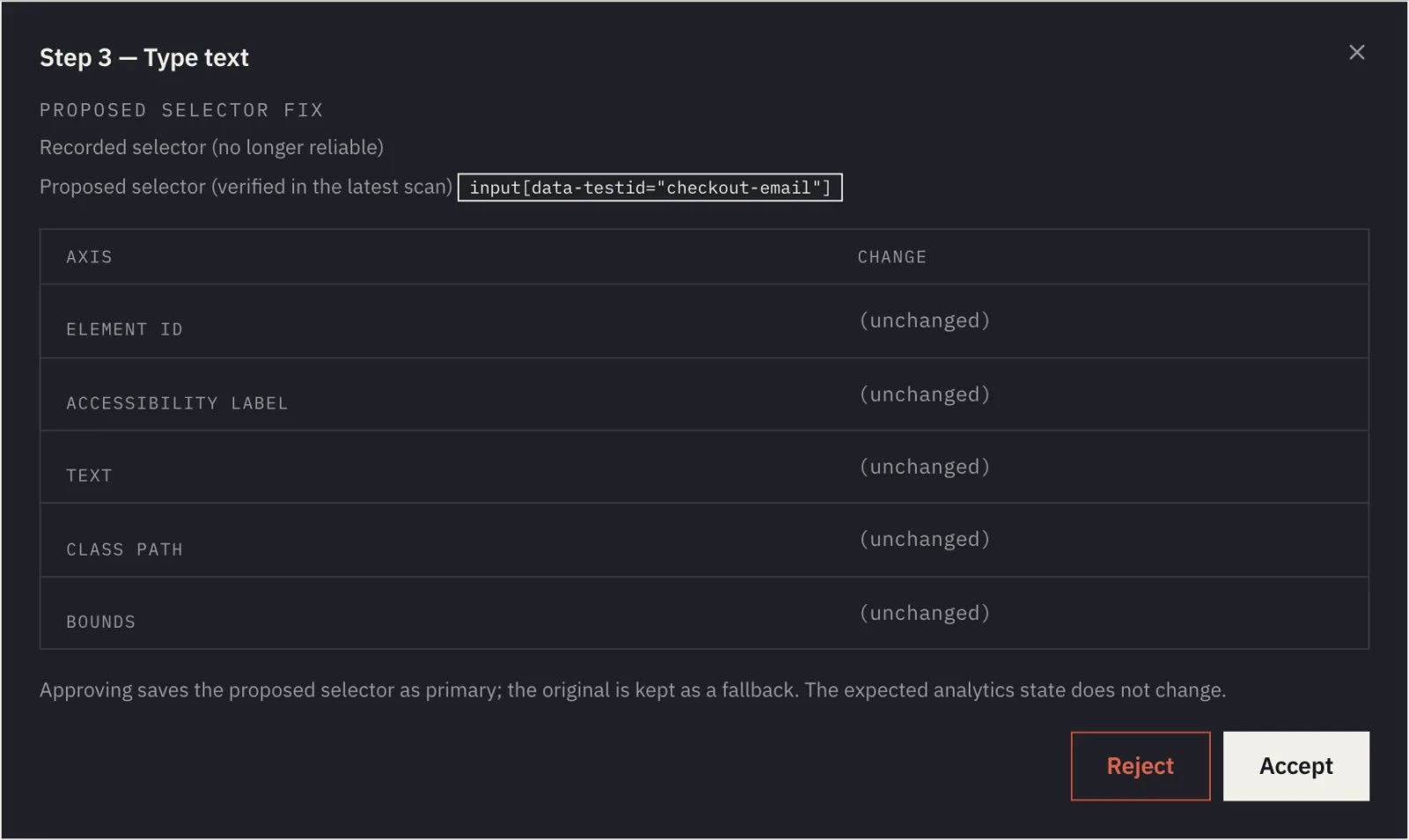
Before you accept, check two things:
- It is the same element. Open the step's screenshot. The selector must point at the field or button you recorded, not at its neighbour.
- The selector will last.
data-testid,nameor a meaningfulidsurvive a redesign. A position in the page tree or a generated class does not.
Accept saves the proposed selector as primary and keeps the original as a fallback. The expected analytics state does not change: the step keeps being compared with what you already know, and monitoring resumes with the next scan.
Reject changes nothing in the journey. The step will keep being found by a substitute route and the expected state will not be refreshed from it, so you will probably want to re-record.
If the dialog says no unambiguous stable selector was found, the proposal is informational only. The scan found the element at run time and verified the action, but has nothing it could save. Accepting records your decision; the journey stays the same. If this keeps happening for a step, re-record it.
The dialog handles one more kind of proposal: a changed element property, such as a button's text. The table then shows the original and the new value. Accepting says the change is expected for this step, and that property will not be flagged here again. The selector does not change.
When re-recording is the better option
- The element the step targets no longer exists on the site.
- The journey itself changed, for example the checkout has a new step or a step lands on a different page than usual.
- The fix proposal points at a different element, or keeps being informational only.
- Monitoring is not running because steps are located only by text or coordinates.
Re-recording costs more than an accepted fix. The expected state is kept only when every previously saved step is still there with the same address, action and selector. If even one of them changed or disappeared, the expected state of the whole journey is established again from the next scans. So it pays to accept a correct proposal and re-record only where the journey itself changed.
One tip that saves the most work: the recorder picks selectors from test attributes (data-testid and similar) first, then from a non-generated id, the accessible label and name. When developers add data-testid to the buttons and fields of your conversion path, the selectors survive a redesign. Steps recorded before that do not know the new attributes, so re-record them once the change is live.