Integrations
The GitHub pull request check
A change to the cart template passes code review, the tests are green, and a week later purchase is missing from the report. The pull request check moves that moment before the merge: we replay every pull request on its preview environment with the same journeys you monitor in production, and post the result to GitHub as a check named AnalyticsProof.
What you need
- A project on the Professional plan or higher and a website or HbbTV test with at least one recorded journey. The "Connect GitHub" button is on the test page. Editors and above can change the GitHub connection; everyone else sees the button greyed out.
- A preview environment deployed to its own https address for each pull request. It can sit behind a password or an IP allowlist; both are set in the third step.
- Journeys recorded in the time zone of the scan country. If one does not match, the dialog names it and asks you to re-record it before turning the check on.
The setup has three steps: Repository, Preview URL and Access.
Step 1: Repository
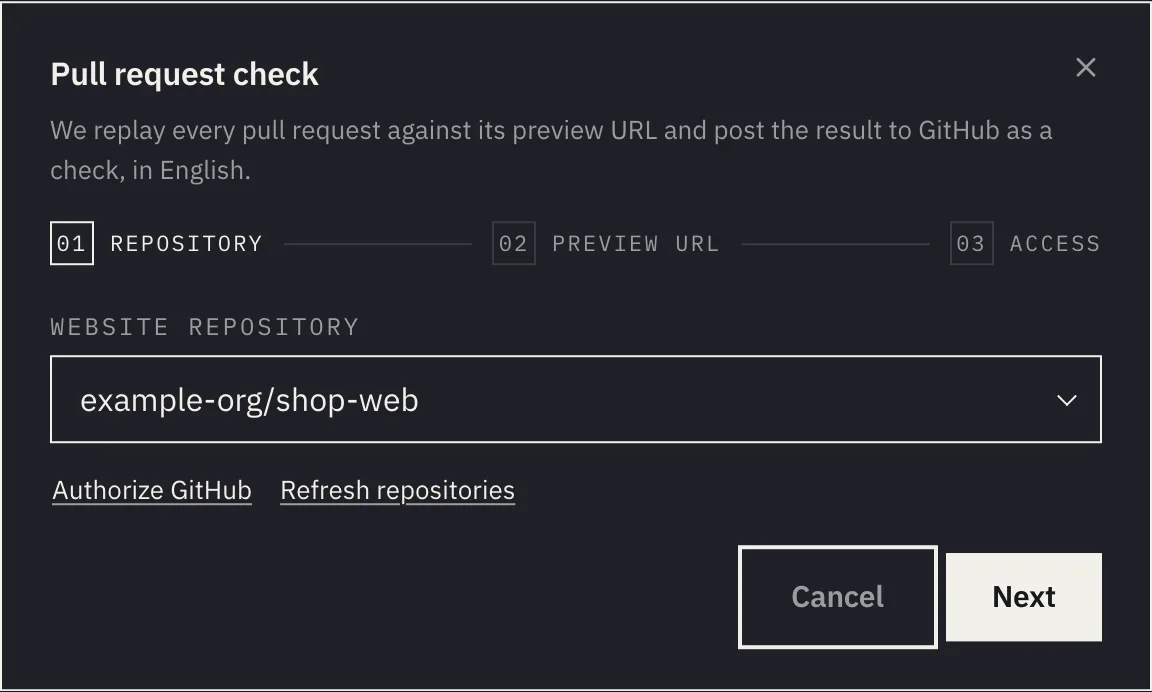
Click "Authorize GitHub". A new tab opens where you grant access on GitHub, after which we can see the repositories you are allowed to change. If the AnalyticsProof App is not installed in your organization yet, a "Connect the AnalyticsProof App on GitHub" link appears. When installing, choose "Only select repositories" and tick just the website's repository. Back in the dialog, use "Refresh repositories" and pick it under "Website repository".
Step 2: Preview URL
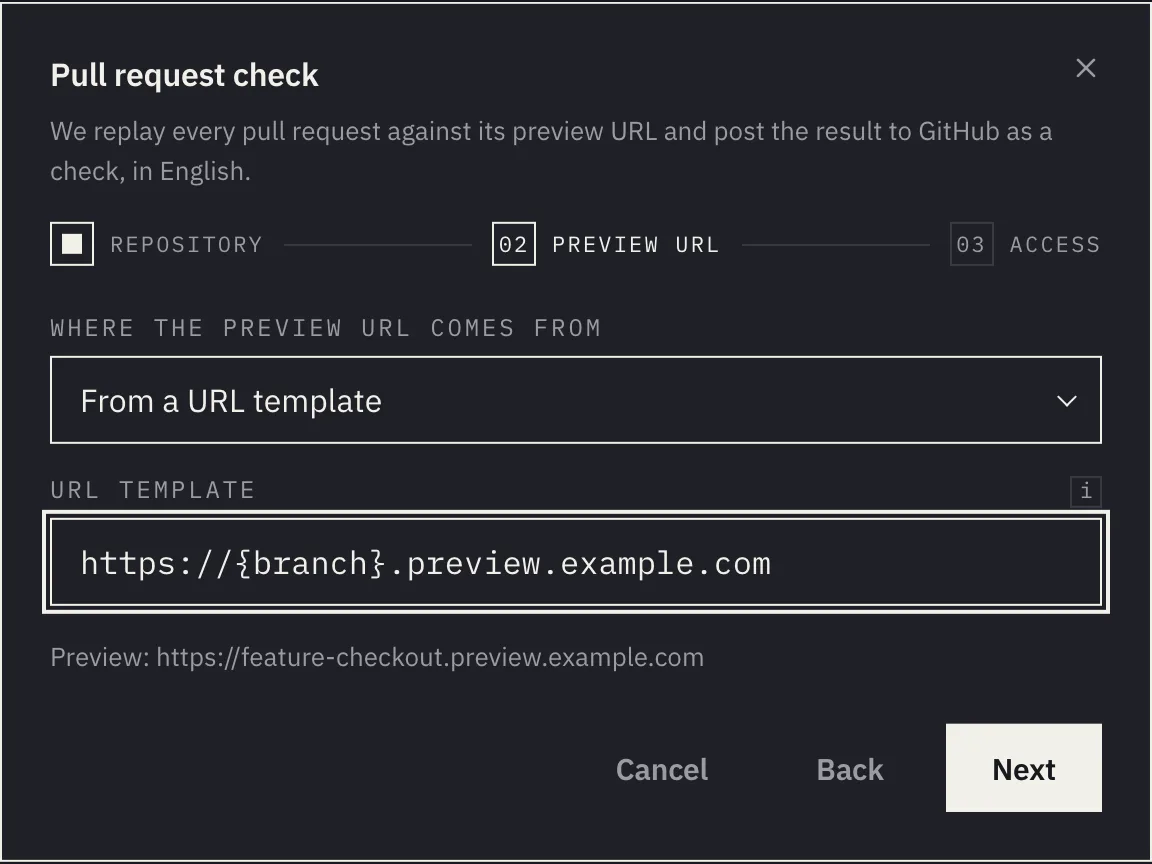
"Where the preview URL comes from" offers two options.
From GitHub Deployments. Use it when your hosting or pipeline reports pull request deployments to GitHub. We wait for a deployment of the pull request's commit with the state success and an environment URL (environment_url). Until it arrives, the check says it is waiting for the address. If nothing arrives within 10 minutes of the check starting, the check ends as neutral.
From a URL template. Use it when the preview address is predictable. The template takes these placeholders:
| Placeholder | Replaced with |
|---|---|
{branch} |
The branch name in lower case, each run of other characters replaced by a hyphen |
{pr} |
The pull request number |
{sha} |
The full commit hash |
{sha7} |
The first seven characters of the commit hash |
Below the field you see straight away what the address would be for the branch feature/checkout. The template must lead to a public domain over https://, without a port number, without a username or password in the address, and without an IP address. The dialog rejects local names (.local, .internal, .test, .example and similar). A template without any placeholder is accepted, but the dialog warns that every pull request would be tested against the same address.
Step 3: Access
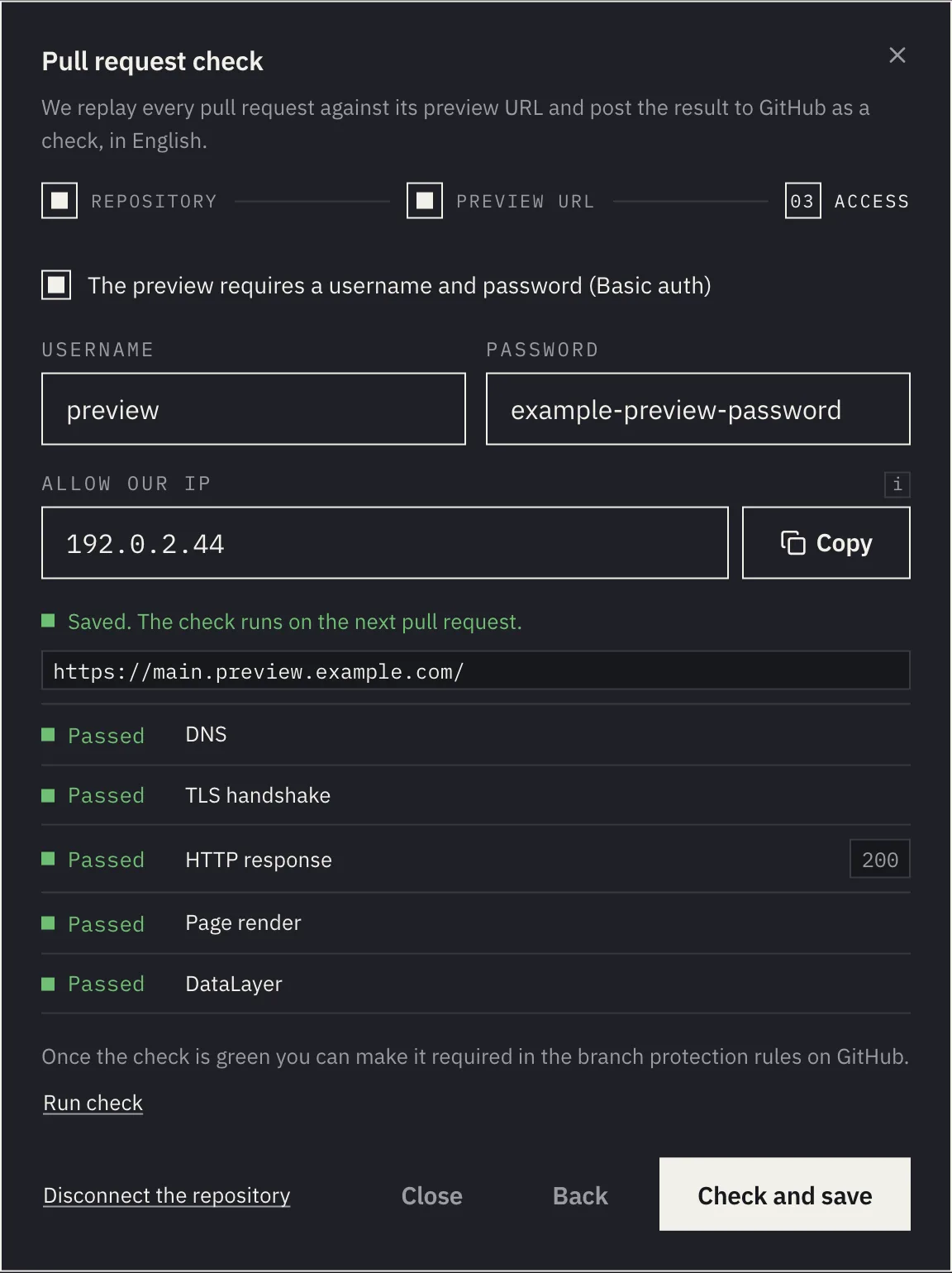
Preview password. If the preview is behind Basic auth, tick "The preview requires a username and password (Basic auth)" and fill both in. The browser sends them only to the preview's own origin, never to other services on the page. The password is stored as plain text and editors can read it in the dialog, so use a separate login that exists only for the preview, not a personal account.
IP allowlist. The "Allow our IP" field holds the address we scan from. It follows the country chosen when the test was created, and pull request scans use the same address. Add it to the preview environment's allowlist.
"Check and save" first tries to open the preview: DNS, TLS handshake, HTTP response, page render and DataLayer. It saves only when that check passes (the next paragraph covers the exception for {pr} in the host name). When it fails, you see which step failed and what to do about it.
There is no pull request at that moment, so the check uses the repository's default branch and its latest commit. The template gets the default branch name, and {pr} becomes zero. When {pr} is in the host name (for example https://pr-{pr}.preview.example.com), the address with zero usually does not exist, because the preview only appears with a pull request. When it does not respond, the dialog offers "Save anyway", and the real address is first used by the check on the first pull request. A template without {pr} in the host name must pass the check, even if it has {pr} in the path or query. With GitHub Deployments, the latest commit on the default branch needs a successful deployment. If it has none, the dialog offers "Save anyway".
Once saved, the dialog offers "Run check". It replays the journeys against the same address the check used, and "Open the results" leads to the result in the dashboard. It is the quickest way to prove the whole setup before a colleague meets it on their pull request. When the host name contains {pr}, the dialog does not offer the trial check, because the address with zero does not exist. There, the first pull request is the real test.
What the check reports
The check runs when a pull request is opened, pushed to, reopened or marked ready for review. A draft pull request gets a neutral check and is replayed once it is ready for review. A commit that already has a pass or a failure keeps it while the pull request is a draft. "Re-run" on the check works up to 3 times per commit per hour. Over that limit the check reads AnalyticsProof — re-run limit reached, unless the commit already has a pass or a failure or is still being measured: then the click changes nothing and that result stands. If a newer push arrives in the meantime, the older commit's check ends as neutral and the result is posted only for the newest commit.
- Every active journey of the test is replayed, each starting at the preview URL. It runs as a dry run: it produces differences and a result for the check, but writes nothing to the journey or its expected state. The guide CI/CD with the API has more on dry runs.
- Only what the website pushes directly to its data layer counts:
window.dataLayer, and on sites with the Adobe Client Data Layer alsowindow.adobeDataLayer. Requests that tools such as GA4 or Adobe Analytics send on from there stay in the dashboard; a developer changing the website does not own them directly. - Only what the pull request introduced is judged. Differences are compared with the journey's latest production scan, and the pull request comment splits them into "New in this PR" and "Already on production". If production has not been scanned yet, everything counts as new.
- Only critical changes block. Typically that is an event the expected state requires and the step no longer sends (unless you marked it optional). A new event, a missing parameter or a different parameter type are warnings: the comment lists them, but the check stays green. Parameter values are not compared, only their presence and JavaScript type. In the dashboard, critical changes carry a red mark and warnings an amber one.
- A journey that could not be measured is not green. If a journey's scan fails, measures nothing or stops at its first step, the check turns red even without a single change. A journey that stops at a later step is only a warning: a larger website change probably broke it, not this pull request.
The check and the comment are in English regardless of your dashboard language. The repository's reviewers read them, and the check name has to stay stable for branch protection.
Making the check required
Once the check has passed for the first time, you can make it required on GitHub. In the branch protection rules or a repository ruleset, require status checks and select AnalyticsProof. GitHub only offers checks that have run in the repository recently, which is why this works only after the first run.
Keep in mind that GitHub treats a neutral result as satisfied. A pull request for which no preview was found, a draft, or one where no journey could be compared therefore does not block the merge.
When the check does not do what you expect
| Check title | What it means | What to do |
|---|---|---|
AnalyticsProof — critical dataLayer change |
A journey found a critical change. | The check's table shows each journey's status and findings; the detail is behind the result link. |
AnalyticsProof — preview could not be measured |
No journey found a critical change, but at least one could not be measured: the preview did not open, the scan measured nothing, the journey stopped at its first step or could not be started, or the result was incomplete. | Check that the preview address works and lets our browser in (password, IP allowlist). The comment names each affected journey. |
AnalyticsProof — superseded by a newer commit |
A newer commit was pushed to the pull request before this one finished. | Nothing. The result is on the check of the newest commit. |
AnalyticsProof — waiting for a preview URL |
No deployment with an address has arrived yet, or the template address could not be used. | Make sure the hosting reports a deployment for the pull request's commit, or fix the template. |
AnalyticsProof — nothing measurable |
No journey could be compared, typically because none has an expected state yet. As soon as at least one journey can be compared, the check is green or red by it, and the table lists the others with the reason. | Wait until the journeys have built their expected state; its state is shown on the journey in the dashboard. |
AnalyticsProof — nothing to run |
The test has no active journey. | Record a journey or resume a paused one. |
AnalyticsProof — interrupted, not judged |
AnalyticsProof was interrupted by our own maintenance or a restart (including a shutdown or our own database failing) before every journey was measured, or a scan was still waiting in our queue when the 15-minute deadline ran out. A scan that our scanner rejected or that failed there (for example a busy or rate-limited scanner) still shows as AnalyticsProof — preview could not be measured. Nothing in the pull request was judged as failing, so the neutral check does not block the merge. While the check retries by itself, it reads AnalyticsProof — interrupted, retrying…. |
Click "Re-run" on the check to measure again. |
AnalyticsProof — re-run interrupted, previous failure stands |
A re-run of a commit that had already failed was interrupted on our side before every journey was measured. The previous failure stands, so the check stays red. | Click "Re-run" on the check to measure again. |
AnalyticsProof — re-run not judged, previous failure stands |
A re-run of a commit that had already failed ended without judging anything (for example no preview URL, nothing to run, or nothing measurable). The previous failure stands, so the check stays red; the summary gives the reason. | Fix the reason in the summary, then click "Re-run". |
AnalyticsProof — Professional plan required |
The project is not on the Professional plan or higher. | The pull request check is part of the Professional plan and higher. |
AnalyticsProof — not configured |
The App is installed on the repository, but the repository is not connected to any test. | Connect it in the test's GitHub dialog, or remove the repository from the App's installation. |
AnalyticsProof — will run once the PR is ready for review |
The pull request is a draft. | Mark it ready for review; the check then runs by itself. |
AnalyticsProof — re-run limit reached |
"Re-run" was used 3 times on this commit within the last hour. A pass or a failure already on the commit, or one still being measured, is not replaced by this check. | Try again later or push a new commit. |
A common cause of a red check is not the dataLayer at all. The preview turns our browser away because the IP is missing from the allowlist or the password is wrong. Run "Check and save" again; it shows exactly which step of the access failed.
Not on GitHub, or want to build your own gate? The API does the same: the guide CI/CD with the API walks through it, and the CI recipes are ready to copy.